

Hello everyone, welcome back to CybercityHelp. Many people get confused when they see 100 Continue status code while checking API responses, server logs, or hosting-related tasks, they immediately start getting panic and assume that something is broken on their website or server. Many of us start assuming that 300 Continue might be an error which can break our website or application. But the reality is very different.
So in our today’s article, we are going to clearly understand what 100 Continue actually is, why it appears, whether it is really an error or not, when it becomes a problem, and whether you should worry about it or simply ignore it. By the end of this article, you will have complete clarity about 100 continue status code and you won’t get panicked next time when you see it. So let’s get started now.
What is 100 Continue?
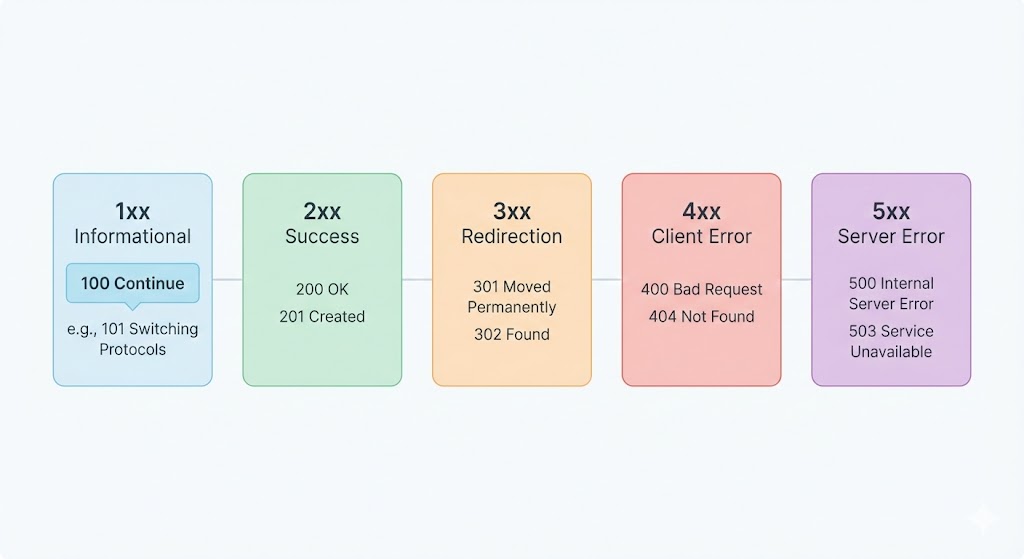
The 100 Continue is not actually an error in the traditional sense. It is an HTTP informational status code. This response is sent by a server to tell the client (usually a browser, API client, or application) that everything is fine so far, and the client can continue sending the request body.
For example, it’s just like when a client wants to send a large request like uploading a file or sending a big payload, it first asks the server like this: “Hey, are you ready to accept this request?” If the server responds with 100 Continue, then it means “Yes, I’m ready. Go ahead and send the remaining data.”
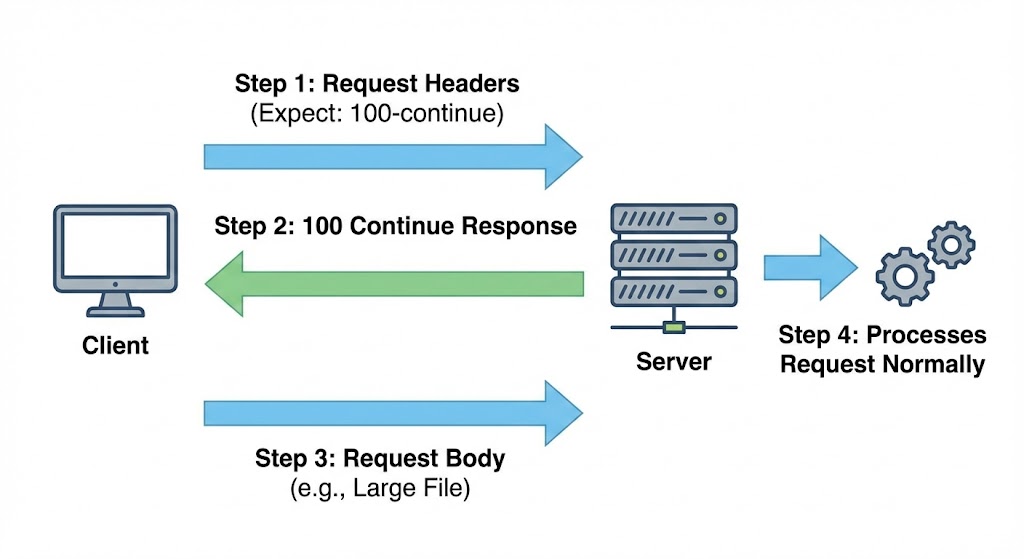
So technically, 100 Continue is a communication signal used in computer networking, not an error or failure.
Why Does 100 Continue Appear?
The 100 Continue response usually appears when the request includes a special header called:
Expect: 100-continue
This header is used by clients to avoid sending large data unnecessarily. Instead of sending everything at once, the client first waits for confirmation from the server. If the server is okay with the request, it replies with 100 Continue, and then the client sends the actual data.
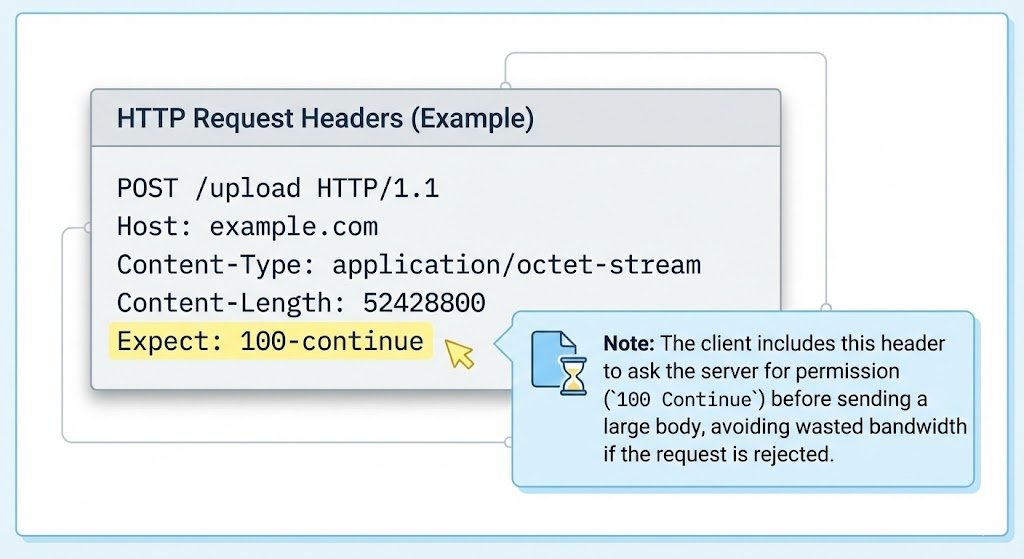
This behavior is very common in scenarios like file uploading, API calling requests with large data, server to server communication or applications using HTTP/1.1 requests. So seeing a 100 Continue response is often a sign that your client and server are communicating correctly. It’s a green signal not red one.
Is 100 Continue Really an Error?
This is where most people get confused. Even though many tools or logs label it as an “error”, 100 continue is not an error at all. It belongs to the 1xx informational response category, which simply means “request received, continue processing”.
Unlike 4xx or 5xx status codes, it does not indicate any failure, misconfiguration, or problem. In fact, in many cases, 100 continue is a good sign, because it shows that your server is properly handling requests in a structured way.
When Can 100 Continue Become a Problem?
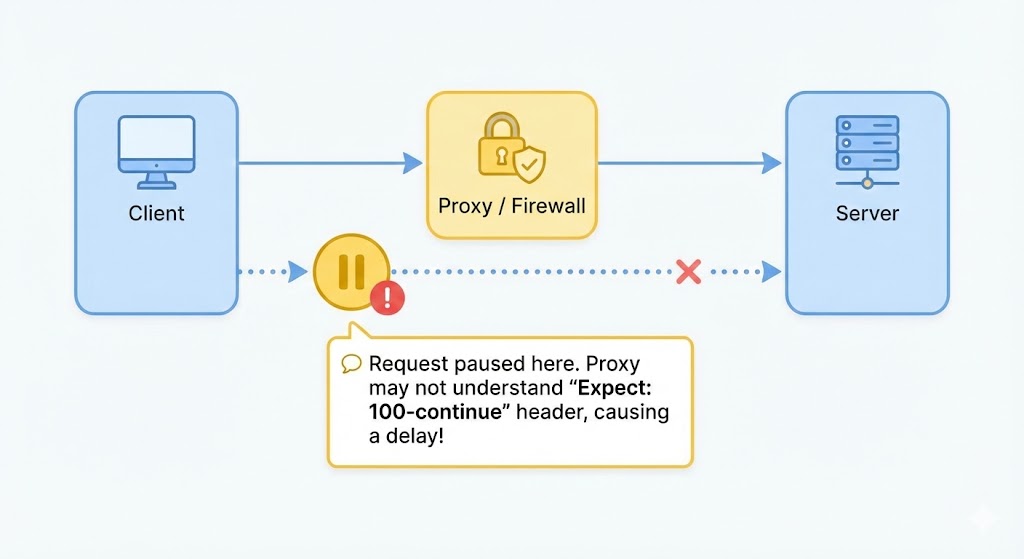
Although 100 Continue itself is harmless, but sometimes it can cause confusion or delays in specific situations. For example:
- If a client expects a 100 Continue response but the server does not handle it properly, the request may appear to hang or delay. This is more common in older servers, misconfigured proxies, or poorly written API clients.
- Another situation is when security tools, firewalls, or CDN services misinterpret the Expect header and block or delay the request. In such cases, developers may think their API or website is broken, while the real issue lies in request handling.
- But again, the issue is not the 100 Continue response itself, but how the client or server handles it.
Should You Worry If You See 100 Continue in Server Logs?
In most cases, you should not worry at all. If your website, API, or application is working normally, then seeing 100 Continue in logs is nothing to panic about. It simply means the request negotiation process is happening correctly.
You should only investigate further but if you encounter the following situations like:
- Requests are getting stuck
- File uploads are failing
- APIs are responding slowly
- Errors appear after the 100 Continue response
In such cases, the focus should be on request configuration, headers, proxy behavior, or server compatibility, not on removing the 100 Continue response itself.
Alright, so this was the complete explanation of 100 Continue in simple and clear language. We discussed what it is, why it appears, whether it is really an error, when it can cause issues, and whether you should worry about it or not.
We hope this article cleared all your confusion regarding the 100 Continue response and saved you from unnecessary confusions. If you still have doubts or are facing real issues related to this status code, feel free to tell us in the comment section. So stay connected, and that’s all for today’s article. Thank you so much for reading till the end!
“So keep learning, keep growing!”
