Close Menu
  • Home
  • SEO
  • Programming
  • Google Products
  • Solutions
  • Tech Guidance
  • Online Tools
  • More
    • About Us
    • Contact Us
    • Privacy Policy
CybercityHelp
  • Home
  • SEO
  • Programming
  • Google Products
  • Solutions
  • Tech Guidance
  • Online Tools
  • More
    • About Us
    • Contact Us
    • Privacy Policy
CybercityHelp
Home » Python Installation: How to Download and Install Python IDLE Software?
Programming

Python Installation: How to Download and Install Python IDLE Software?

adminBy adminDecember 7, 2025Updated:January 18, 202627 Comments4 Mins Read
Python Installation: How to Download and Install Python IDLE Software?

Hello everyone, welcome back to CybercityHelp. As we promised in our previous article, today we are here with the installation process of Python IDLE software. In our today’s article, we will learn how to download and install Python IDLE software and how you can start using it. We will explain everything step by step. So let’s get started!

How to Download and Install Python IDLE Software?

To install Python IDLE on your Windows desktop, laptop, or computer, you just need to follow a few simple steps.

Step 1: Visit python.org and Download Python

The first step is to visit the official Python website and download Python. So open your browser, type www.python.org, and press Enter. You will be redirected to the official Python homepage. If you scroll down a little, you will see sections like latest news, upcoming events, and other details.

For example:

CybercityHelp

Now go to the Downloads section where you will see all available releases. Under the releases section, you will see the latest version of Python. Just click on the button that says Download Python 3.10.2.

For example:

CybercityHelp

Step 2: Save and Configure PATH

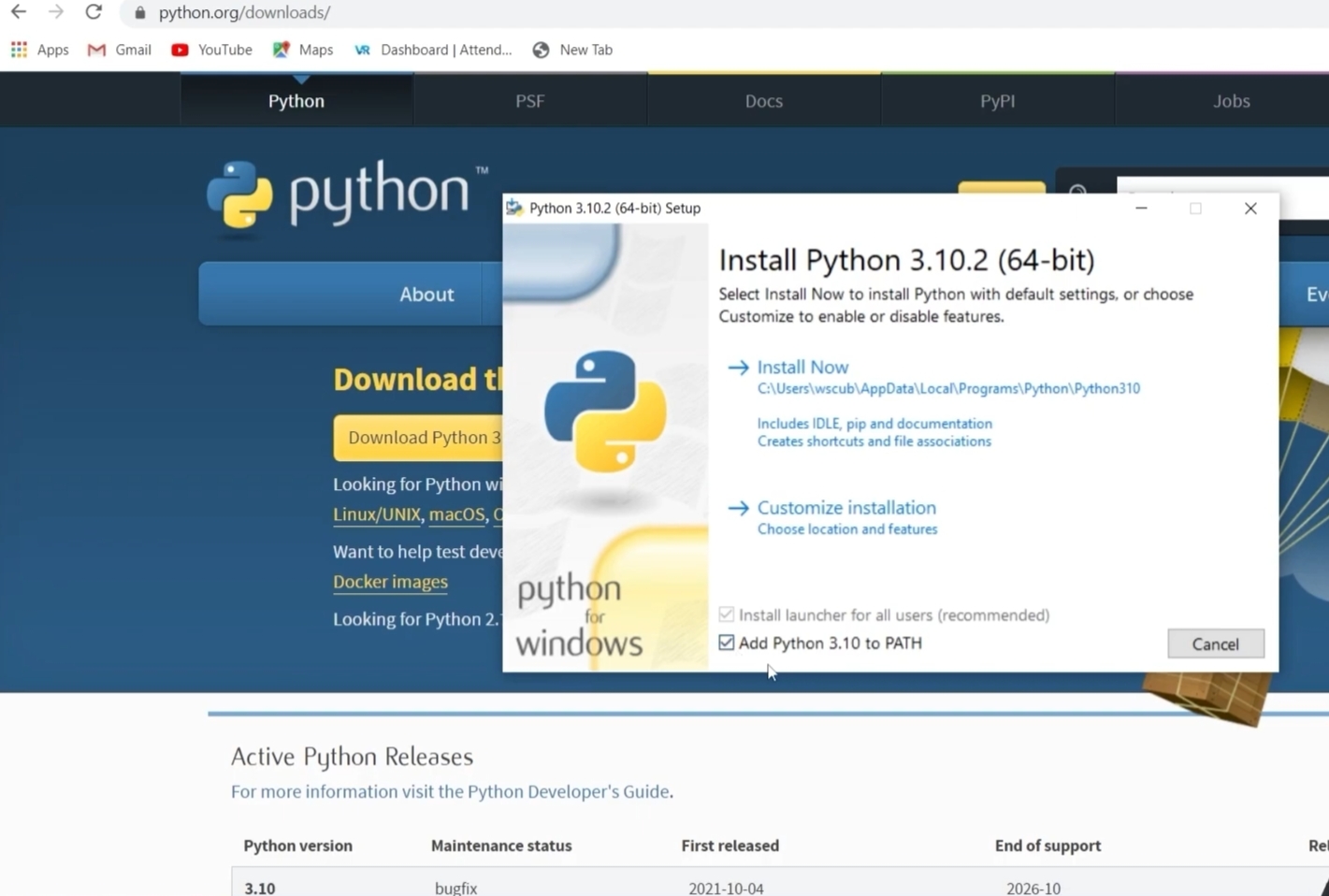
Once you click on the download button, you will get an option to save the file. After clicking Save, the download will start. When the setup file opens, make sure to tick the checkbox that says Add Python 3.10.2 to PATH. This is a very important step, so please don’t forget to select it.

For example:
CybercityHelp

After that, click on Install Now. The installation will finish quickly. Once it’s done, simply click on Close.

Step 3: Open Python IDLE Software

Now the next step is to open Python IDLE. Go to your system’s search bar and type IDLE. You will see the Python application. Double-click to open it. Once opened, you will see the Python shell: this is where we write and execute our Python code. If you want to create a new file, go to File → New File. A new window will open where you can write your program.

For example:

CybercityHelp

While saving your file, we suggest not saving it inside the same folder where Python is installed. Save it in a different folder like your Desktop or Documents. Saving it in the Python installation folder may cause issues while running your programs.

Step 4: Run Python IDLE Software Program

Now let’s run a small program to check if everything is working fine. Write a simple statement like:

print('Hello, World!')

To run your code, click on the Run option or press Ctrl + F5. You will be asked to save your file. Save it as something like python001.py or any name you want.

What is .py?

It is the file extension for Python files. Every Python program is saved with a .py extension. After saving the file, your program will execute, and the output will appear in the Python shell as Hello, World!

For example:

CybercityHelp


Alright, so this is how you can download, install, and run Python IDLE software on your Windows system. We hope everything is now clear to you. If you still have any doubts, feel free to ask us in the comment section. We are available 24×7 to help you.

In our next article, we will teach you how to download PyCharm. Don’t get confused between Python IDLE and PyCharm. PyCharm is another software we use for coding. You might be wondering why we need PyCharm if we already have IDLE?

Well, IDLE is good, but PyCharm offers a better user interface and more advanced features. But that does not mean you should delete IDLE. Don’t delete it because PyCharm also requires IDLE to function properly. Without IDLE, PyCharm may not work correctly.

We will explain this in detail in the next article while learning how to install and use PyCharm. So that’s all for today’s article. Thank you so much for reading till the end!

“So keep learning, keep growing!”

Post Views: 111,071

Share this:

Related posts:

  • Machine Learning Dataset Basics: Defination, Types, Train-Test Split, and Validation Data

    Machine Learning Dataset Basics: Defination, Types, Train-Test Split, and Validation Data

  • NumPy Matrix Functions: What They Are and Different Types of NumPy Matrix Functions

    NumPy Matrix Functions: What They Are and Different Types of NumPy Matrix Functions

  • Machine Learning Data Basics: Features, Labels, Differences, Importance and Clear Examples

    Machine Learning Data Basics: Features, Labels, Differences, Importance and Clear Examples

How to Download and Install Python IDLE Software? Python Compiler Python IDLE Python IDLE Software Python Software Download
Previous ArticlePython Basics: Translators, Compilers and Interpreters Explained
Next Article PyCharm Installation: What is PyCharm & How to Install PyCharm?
admin
  • Website

Related Posts

Machine Learning Dataset Basics: Defination, Types, Train-Test Split, and Validation Data

December 27, 2025

NumPy Matrix Functions: What They Are and Different Types of NumPy Matrix Functions

December 25, 2025

Machine Learning Data Basics: Features, Labels, Differences, Importance and Clear Examples

December 23, 2025

27 Comments

  1. Babul hassani on July 22, 2023 4:31 pm

    Yes

    Reply
    • Hhhh on August 7, 2023 3:20 pm

      Yes

      Reply
  2. Najid on July 24, 2023 7:14 pm

    Nice site

    Reply
  3. Najid on July 24, 2023 7:14 pm

    I am najid
    Nice Web site

    Reply
    • Harsh on August 18, 2023 11:53 am

      Nice website

      Reply
      • Gjjbvf on March 12, 2024 3:39 pm

        Nice

        Reply
  4. Ganesh on July 31, 2023 5:05 am

    Wonder full and usefull website

    Reply
  5. Ganesh on July 31, 2023 5:06 am

    WONDERFUL AND USEFUL WEBSITE
    THANKS FOR THE TEAM OF THE WEBSITE

    Reply
  6. Amandeep Singh on August 16, 2023 4:19 am

    Good

    Reply
    • Abuzar on August 19, 2023 11:47 am

      Thanks

      Reply
  7. Siddharth on August 17, 2023 11:29 am

    Nice

    Reply
    • Rosy on March 8, 2024 6:11 am

      Thanks

      Reply
  8. Harsh on August 18, 2023 11:54 am

    Yes

    Reply
  9. sameer on August 21, 2023 6:31 pm

    op bro

    Reply
  10. Venise on August 23, 2023 5:47 pm

    Very interesting

    Reply
    • Rosy on March 8, 2024 6:14 am

      Nice

      Reply
  11. Venise on August 23, 2023 5:48 pm

    Yes

    Reply
  12. Sheep on December 9, 2023 4:35 am

    Yo

    Reply
  13. Hukumsingh on December 28, 2023 4:53 am

    Good

    Reply
  14. Akhil on January 2, 2024 5:55 am

    Super nice

    Reply
  15. Krish on January 2, 2024 6:21 pm

    Nice

    Reply
  16. Sidg on February 16, 2024 3:10 am

    Wow

    Reply
  17. Alok Meher on February 16, 2024 12:33 pm

    Best website

    Reply
  18. Manan on March 26, 2024 11:29 pm

    Good

    Reply
  19. Jashuva on April 2, 2024 6:39 am

    Hi 🤗

    Reply
  20. Riya Arya on June 6, 2024 9:56 pm

    Good

    Reply
  21. Koi you on October 27, 2024 12:21 pm

    Nice website

    Reply
Leave A Reply Cancel Reply

Categories
  • Google Products (11)
  • Programming (18)
  • SEO (8)
  • Solutions (19)
  • Tech Guidance (28)
Pages
  • About Us
  • Contact Us
  • Privacy Policy
Recent Posts
  • How to Fix “Crawled – Currently Not Indexed” in Google Search Console?
  • How to Fix “Alternate Page With Proper Canonical Tag” Issue in Google Search Console?
  • How to Prevent YouTube Channel From Community Guidelines Strike?
  • How to Protect YouTube Channel From Mass Reporting?
  • How to Fix “Reused Content” on YouTube Videos?
Copyright © 2026, All Rights Reserved By CybercityHelp.in

Type above and press Enter to search. Press Esc to cancel.

Ad Blocker Detected!
Our website is made possible by displaying online advertisements to our visitors. Please support us by disabling your Ad Blocker.
Refresh